Incident Management
When a service experiences an outage, degradation, or other disruption, restoring the service is only part of the response. Users and stakeholders also need to understand what is happening, which services are affected, and when normal operation is expected to resume. Incident management provides a structured way to document service disruptions and communicate their progress from detection to resolution.
ARGO Monitoring supports incident management by allowing authorized users to create, manage, and communicate incidents directly through the status page. Each incident is associated with a service in the status page's service catalog, making it possible to clearly identify which service is affected and provide users with relevant information about the disruption.
An incident represents an event that causes a disruption to, or reduction in the quality of, a service and requires attention from the service team. Incidents may result from unexpected failures, service degradation, infrastructure problems, or other events that affect normal service operation. Planned activities, such as maintenance, can also be communicated through the incident management workflow when they are expected to affect service availability or performance.
Incident management provides a structured lifecycle for communicating these events. An authorized user can create an incident, identify the affected service, describe the problem, and publish updates as the situation evolves. As the response progresses, additional information can be added to keep users informed about the current status and any actions being taken. Once the service has returned to normal operation, the incident can be resolved and its lifecycle brought to an end.
The incident history provides a record of what happened and how the disruption was communicated over time. Instead of relying on separate emails, messages, or informal communication, incident information is maintained as part of the status page, giving stakeholders a consistent source of information during a service disruption.
Incident management is therefore complementary to monitoring. Monitoring helps identify the operational state of a service, while incident management provides the human-facing process for communicating and managing disruptions. Monitoring results can indicate that a service is unavailable or degraded, while an incident explains the impact, provides context, communicates ongoing actions, and keeps users informed until the issue is resolved.
Incident Management Main Characteristics
Each incident in ARGO Monitoring is recorded as a structured incident ticket containing information that identifies the incident, describes the problem, and establishes its relationship with the affected service.
An incident includes the following information:
- Title — a short title describing the incident.
- Reported date and time — the date and time when the incident was reported.
- Description — information about the incident, including what is unavailable, degraded, or not working correctly.
- Incident ID — a unique identifier assigned to the incident and used for tracking.
- Reporter — the person who reported the incident.
- Service — the service affected by the incident, selected from the services available in the status page's service catalog.
Incident Lifecycle
An incident progresses through a defined lifecycle. The status represents the current stage of the incident and can be updated by an authorized user as the situation develops.
The lifecycle consists of the following statuses:
- Assigned — the incident has been reported and recorded in ARGO Monitoring and has been assigned to the appropriate service team or person for handling.
- In Progress — the incident is actively being investigated and worked on. The service team is diagnosing the problem, determining its cause and impact, and taking the necessary actions to resolve it.
- Pending — work on the incident is temporarily paused because further action or information is required before it can proceed. This may include waiting for feedback, additional information, another team, or an external dependency.
- Resolved — the corrective actions have been completed and the service has been restored or the reported problem has been addressed. The incident is considered resolved, but it may remain open for verification before final closure.
- Closed — the incident has been fully resolved and no further action is required. The incident is closed and remains available as part of the incident history.
An authorized user can change the incident status as the response progresses. The incident also maintains an activity log containing the lifecycle status changes, providing a chronological record of how the incident progressed from reporting to closure.
Comments and Updates
During the incident lifecycle, authorized users can add comments and updates to provide additional information about the situation. These updates can be used to communicate investigation results, actions being taken, changes in impact, recovery progress, or other relevant information.
This allows the incident to serve as an ongoing record of the response rather than containing only the information provided when it was initially reported.
Incident History
Incidents are retained as part of the status page's incident history. The combination of the incident information, comments, and activity log provides a record of the incident and its lifecycle.
Incidents cannot be deleted. This ensures that reported incidents remain part of the historical record and that the history of service disruptions is preserved for transparency, accountability, and future analysis.
Core Concepts
Why Use Incidents?
Incident management provides a structured way to communicate service disruptions and maintain a clear record of their progression. It complements monitoring information by adding context, ownership, and communication throughout the incident lifecycle.
- Communicate service disruptions clearly — incidents provide users and stakeholders with a central source of information about an ongoing disruption, reducing uncertainty and avoiding fragmented communication.
- Identify the affected service — every incident is associated with a service in the status page's service catalog, making the impact of an incident clear and directly traceable to the affected service.
- Keep stakeholders informed throughout the incident — incident updates allow service teams to communicate changes as the situation develops, including ongoing investigation, mitigation actions, and progress toward recovery.
- Provide transparency and accountability — maintaining an incident history creates a clear record of the disruption, its updates, and its resolution, helping organizations demonstrate how service issues were handled.
- Complement monitoring information — monitoring data describes the operational state of a service, while incidents provide additional human-readable context about why a service may be degraded or unavailable and what is being done about it.
- Support continuous improvement — historical incident information can be reviewed after a disruption to identify recurring problems, understand their impact, and improve operational processes and service reliability.
View in the UI
An incident consists of the following attributes:
Title: A short, descriptive title for the incident.
Description: A detailed description of the incident, explaining what is down or not working properly.
Affected Service Groups: The service groups affected by the incident. One or more service groups can be selected from the available list.
Report an incident
| This action can be performed by both Super and Tenant Administrators and any user with access to a Tenant in Argo Monitoring Service, assigned with a role that is allowed to perform this action. |
|---|
The Report Incident page allows authorized users to create a new incident affecting one or more service groups.
To report an incident users first need to access the Incidents page from the menu and the select the Report Incident button
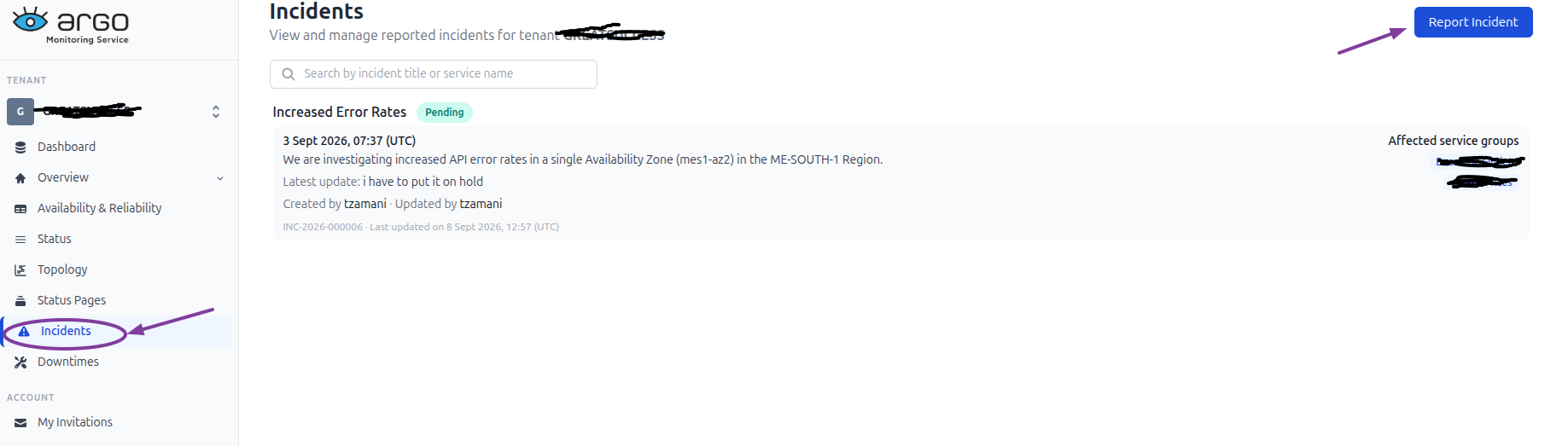
To report an Incident users need to take the following actions
-
Enter a Title describing the incident.
-
Enter a Description explaining what is down or not working properly.
-
Select one or more Affected Service Groups from the list. The search field can be used to quickly find a specific service group.
-
Select Report Incident to create the incident.
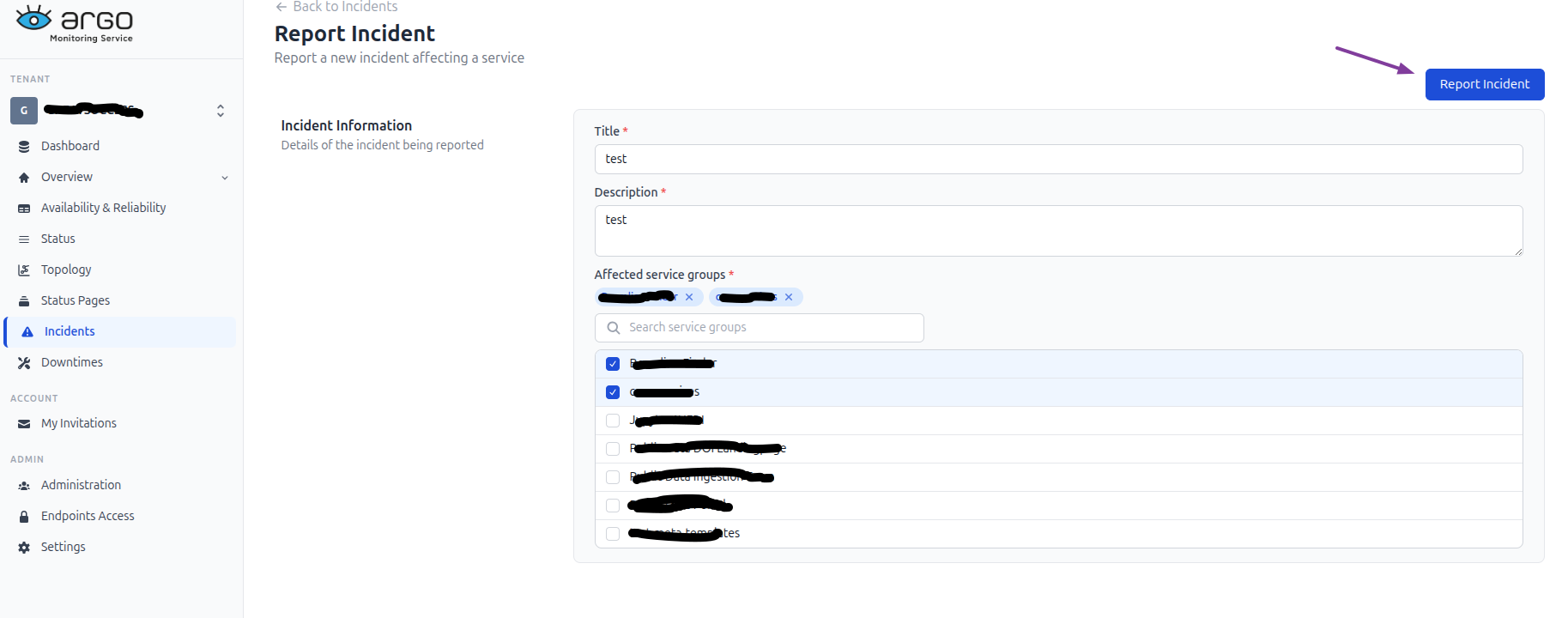
Once the incident is reported, it is recorded in ARGO Monitoring and the contacts associated with the affected service are notified by email.
List of incidents
The Incidents page displays the incidents that have been reported for the tenant.
For each incident, the relevant incident information and its current status are displayed.
Selecting an incident from the Incidents page opens the Incident Details view.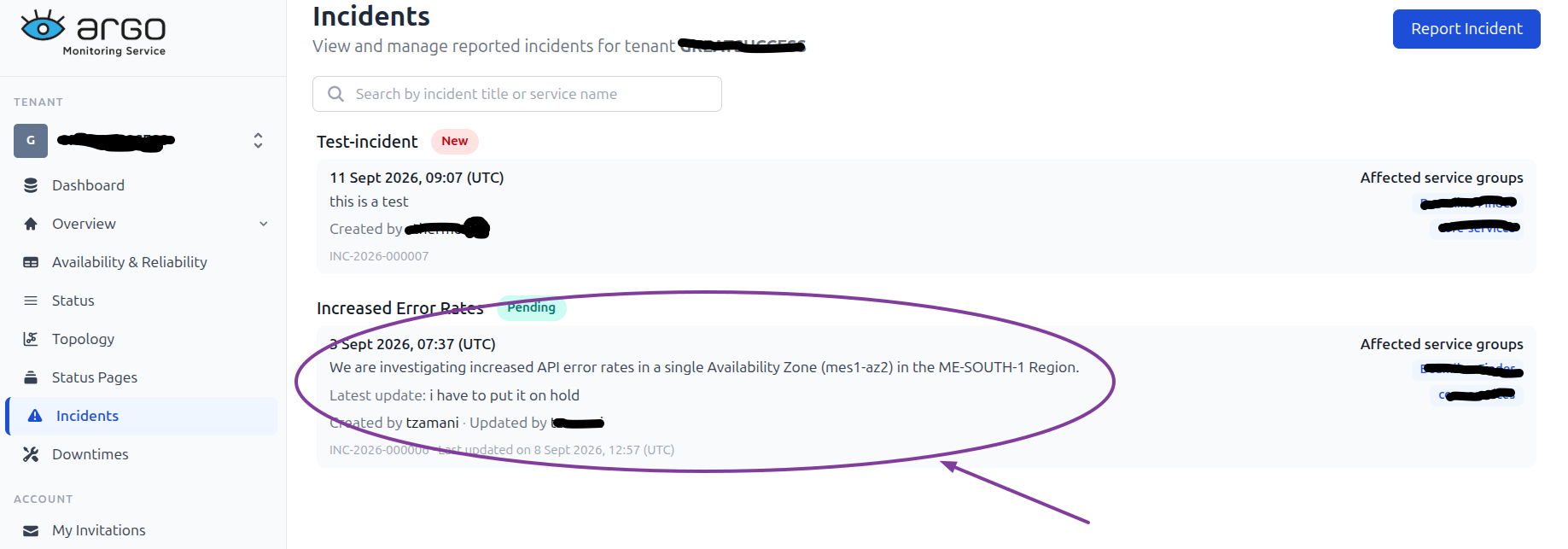
Incident details
This page provides the complete information about the incident, its current status, affected service groups, status updates, and comments.
The incident details page displays:
- Title of the incident.
- Current status of the incident.
- Created date and time of the incident.
- Description providing details about the reported problem.
- Incident ID and the date and time of the latest update.
- Affected service groups associated with the incident.
Update incident status
| This action can be performed by both Super and Tenant Administrators and any user with access to a Tenant in Argo Monitoring Service, assigned with a role that is allowed to perform this action.. |
|---|
The status of an incident can be updated, as it progresses through its lifecycle.
To update the incident:
- Select the required Status from the status dropdown.
- Enter an optional Message describing the status update.
- Select Save to record the update.
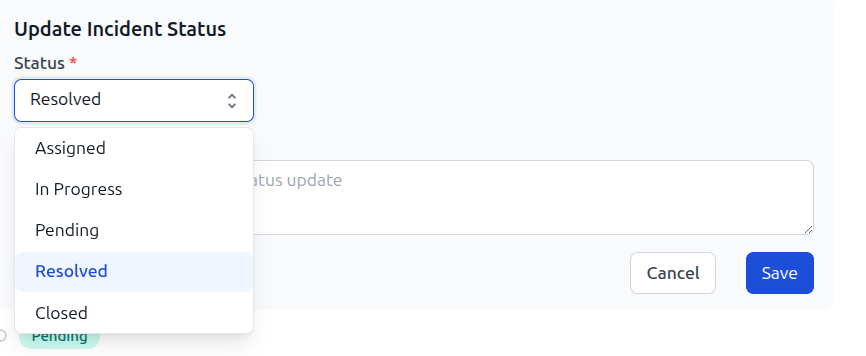
Each status update is added to the incident's activity log, together with the message, date and time of the update, and the user who performed the update.
The activity log provides a chronological view of the incident's progress and allows users to follow the incident from its initial report through to its resolution.
Add comments
| This action can be performed by both Super and Tenant Administrators and any user with access to a Tenant in Argo Monitoring Service, assigned with a role that is allowed to perform this action. |
|---|
Users can add comments to an incident using the Comments field at the bottom of the incident details page.
To add a comment:
- Enter the required information in the Comments field.
- Select Save to add the comment to the incident.

Comments provide a way for authorized users to add additional information without changing the incident status.
Affected service groups
The Affected service groups section displays the service groups associated with the incident. These groups identify the services impacted by the reported issue and provide context about the scope of the incident.
This information remains visible throughout the incident lifecycle, allowing users to understand which services are affected while reviewing the incident and its updates.