Automated Tenant Provisioning
This section is for stakeholders who want to understand the provisioning journey, its evolution, and the business value delivered by the current automated approach.
Introducing Automated Tenant Provisioning
Tenant provisioning used to be one of the most difficult and time-consuming tasks for the Monitoring Service. The process was entirely manual, initiated via email, and required several engineers to handle different components. Because of complex interdependencies within the system, the workflow often faced bottlenecks, stretching completion times from a few hours to several days.
Today, the Monitoring Service has evolved into a streamlined, automated workflow. Once initiated, the process executes without manual intervention and therefore it no longer requires technical expertise—only necessary access permissions.
What is tenant provisioning?
When a new customer — referred to as a tenant — is added to the Monitoring Service, a set of services and infrastructure components must be prepared specifically for that tenant. This includes:
- Preparing dedicated data storage Configuring and integrating topology and monitoring profile services
- Initialising backend processing infrastructure Setting up alert management capabilities
- Completing the monitoring environment and verifying readiness
Until all of these components are in place, the tenant cannot use the Monitoring Service. The speed and reliability of this provisioning process directly affects how quickly new customers can start generating value, and how much engineering effort is consumed in the process.
Pain points
The manual approach introduced several operational and business risks:
-
Slow: total elapsed time ranged from two to five business days, factoring in queue times, handoffs, and back-and-forth verification between teams.
-
Error-prone: each step was executed by a human. Any deviation, missed step, or incorrect parameter could leave the tenant in a broken or partially provisioned state.
-
Hard to track: there was no centralised view of where a tenant was in the provisioning process. Status was typically tracked in spreadsheets or tickets.
-
Bottlenecked: the process consumed significant senior engineering time. As the number of tenants grew, the team's capacity became the limiting factor.
Business impact
Customers experienced delays of several days before going live. The Monitoring Team spent an amount of time on repetitive provisioning work rather than product development.
Summary: Benefits of Automated Provisioning
- Faster time to value for customers: What previously took two to five business days now completes in minutes. New tenants can access the service the same day they are provisioned, improving the customer experience at a critical stage of the onboarding process.
- Reduced engineering effort: Provisioning no longer requires manual engineering effort. The automated workflow runs without intervention, allowing teams to focus on product development and higher-value work.
- Greater reliability and consistency: Every tenant is provisioned through the same codified process, following the same sequence of steps and validation checks. There is no variation between operators, documentation interpretations, or time of day.
- Full operational visibility: The status of every provisioning job is tracked and exposed in real time. When a job fails, teams can immediately identify where the failure occurred, its current state, and any downstream jobs that are affected, significantly reducing investigation time.
Automated Provisioning Architecture
To support automated provisioning, the Monitoring Service follows an event-driven architecture for executing background jobs. The automation workflow is built around three core components:
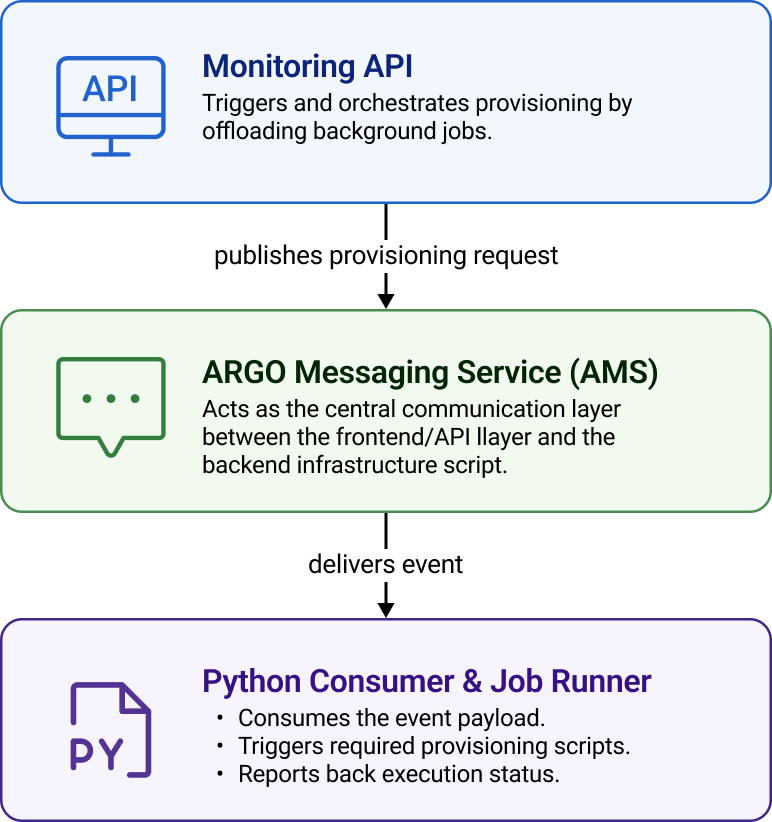
Automation Jobs
When a new tenant is created, the service automatically executes a series of provisioning tasks to prepare the monitoring environment. These tasks run in the background, and their progress can be monitored through the tenant status page.
More specifically, each previous manual step following tenant creation is now a discrete, trackable automation job. There are nine jobs in total:
| INIT_AMS | Initializes the AMS (Alert Management Service) integration |
|---|---|
| Purpose | - creates the required AMS configuration - enables management capabilities |
| INIT_MONGO | Initializes the MongoDB resources required by the tenant |
|---|---|
| Purpose | - creates tenant-specific MongoDB resources - ensures data storage requirements are satisfied |
| CREATE_DOMAIN_NAMES | Creates and configures the domain names required by the tenant |
|---|---|
| Purpose | - prepares the required domain names - domain names are created under the *.mon.argo.grnet.gr wildcard |
| INIT_COMPUTE_ENGINE | Initializes the Compute Engine resources used by the tenant |
|---|---|
| Purpose | - prepares backend processing infrastructure - enables execution of monitoring-related operations |
| INIT_TOPOLOGY_CONNECTOR | Initializes the Topology Connector integration |
|---|---|
| Purpose | - establishes communication with topology-related services - enables topology synchronization |
| INIT_INTEGRATION_TOPO | Connects to Python scripts to fetch topology |
|---|---|
| Purpose | - activates the corresponding topology connector according to the topology feed selected by the user |
| INIT_POEM | Initializes the POEM integration |
|---|---|
| Purpose | - configures communication with the POEM service - enables retrieval and management of monitoring profiles |
| INIT_MONITORING_BOX | Initializes the Monitoring Box service |
|---|---|
| Purpose | - completes the monitoring environment setup - enables monitoring data collection and processing |
| CHECK_READINESS | Performs a readiness check for the tenant environment |
|---|---|
| Purpose | - verifies that all required services have been successfully initialized - confirms that the tenant is ready for operation |
| INIT_ARCHIVER Purpose | Configures the archiver component for backup and redundancy purposes. - The archiver periodically retrieves metric results from a configured message source and stores them for archival purposes. -The event also initiates the collection of the credentials required to access the message source. |
Job Statuses
Each automation job can fall under one of the following statuses:
unknown → initializing → initialized / failed_initialization → in_progress → completed / failed
If an issue occurs before the job can be executed, its status may transition to failed_initialization. If a failure occurs while the job is running, the status may transition to failed. These states provide visibility into where the automation process encountered a problem and can be used for troubleshooting and monitoring purposes.
Job Dependencies
The above jobs come with complex interdependencies and certain components have strict prerequisites. To accurately preserve the integrity of the tenant provisioning lifecycle, the automation workflow strictly enforces cascading state dependencies among components. Cascading state dependencies rely on each job’s status.
Therefore, a failure or a rollback in an upstream job must automatically invalidate the state of all downstream jobs that rely on it.
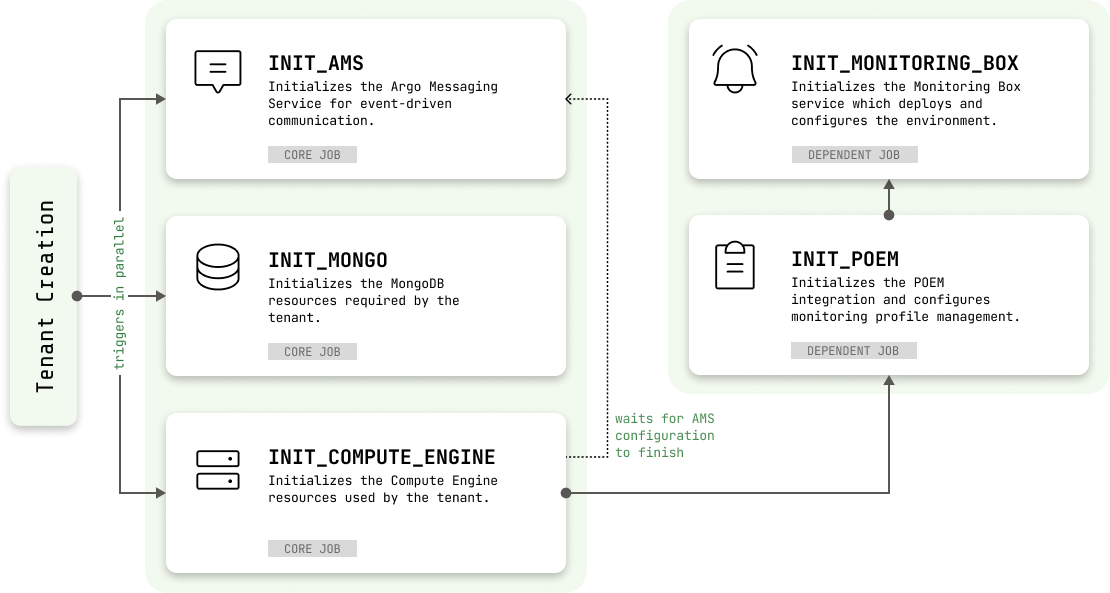
More specifically, when a new tenant is created, the following initialization jobs are started in parallel:
- INIT_AMS: A new project is created in the Messaging service along with the required topics/subscriptions, users and permissions. This is the main transportation layer in the Monitoring Service.
- INIT_MONGO: The main datastore of the Monitoring service. A new mongo database is provisioned in the mongo cluster along with all the required indexes
- INIT_COMPUTE_ENGINE: The main analytics engine. This configures the compute engine for handling the new tenant. In this step some default profiles and reports are created in the backend. Ingestion job is kickstarted waiting monitoring data to ingest and process and batch computation jobs are scheduled to occur at specific intervals when data are ready.
- After the INIT_COMPUTE_ENGINE completes the INIT_POEM job is kickstarted along with the INIT_MONITORING_BOX
- After the INIT_AMS is completed, the INIT_ARCHIVER is kickstarted
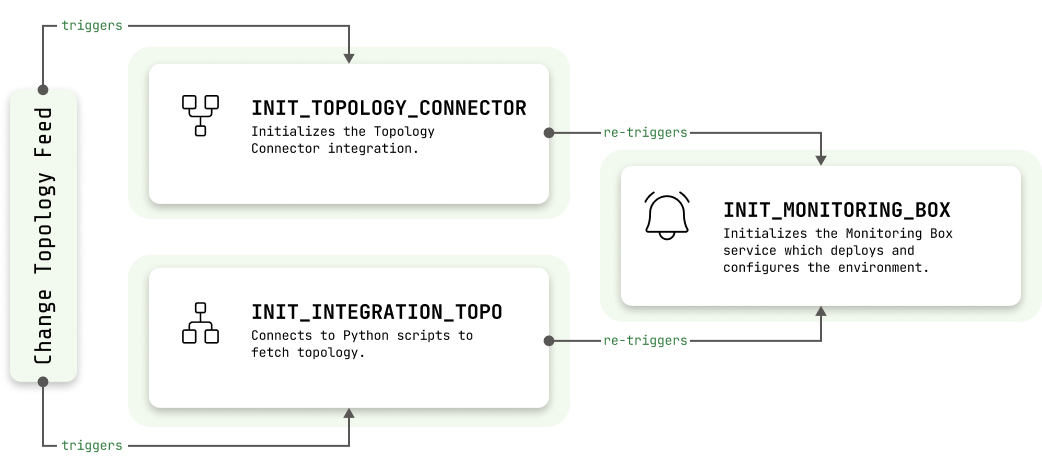
- Changes to the topology feed trigger connectors, which update the topology integration. This re-triggers the INIT_MONITORING_BOX to deploy and configure the environment using the latest topology.
As explained, cascading state dependencies rely on each job’s status. Therefore, for example, if INIT_COMPUTE_ENGINE is moved from the completed state back to a previous state, the dependent INIT_POEM and INIT_MONITORING_BOX jobs are automatically reset to UNKNOWN.
Similarly, if INIT_POEM is reset, the dependent INIT_MONITORING_BOX job is also reset to UNKNOWN.
The goal is to ensure that downstream services do not appear fully provisioned when one of their prerequisites is no longer completed. This deterministic behavior prevents state desynchronization, guaranteeing that downstream services never falsely report as fully provisioned when an underlying core prerequisite is compromised.
Summary: Automated Provisioning Workflow
- AMS Setup: The Alert Management Service (AMS) is configured for the tenant. This service is responsible for managing alert-related functionality and notifications.
- MongoDB Setup: The service initializes the MongoDB resources required by the tenant. These resources are used to store monitoring-related information and configuration data.
- Compute Engine Setup: The Compute Engine resources required for monitoring operations are provisioned and configured. Once the Compute Engine setup is completed successfully, the service automatically continues with the next stage.
- Domain Name configuration: Sometimes the tenant wants specific domain names to be used. This is a manual job that requires different people's interventions.
- POEM Configuration: The POEM integration is configured and prepared for use. This enables the management and retrieval of monitoring profiles required by the monitoring infrastructure. When this step is completed successfully, the final provisioning stage is automatically started.
- Monitoring Box Setup: The Monitoring Box service is initialized and connected to the tenant environment. This final step completes the monitoring infrastructure setup and enables monitoring operations.
- Init Archiver Setup: The archiver component is initialised for backup and redundancy purposes.